Tired of always having to change your lookup preference in Dynamics GP? Now you can set default lookup views.
You can define and save a default lookup view for your master records by selecting the Set as Default View option from the View menu or using the right-click menu in the lookup window. The default view you select will be the view displayed when you open the lookup window the next time.
You can set a default view for the following lookup windows:
- Items lookup window
- Accounts lookup window
- Employees lookup window
- Customers and Prospects lookup window
- Salespeople lookup window
- Vendors lookup window
The default view is saved on a per user, per company basis.
- Open the master record window, here we will use the customer card for our example

- Click on the magnifying glass by the customer ID
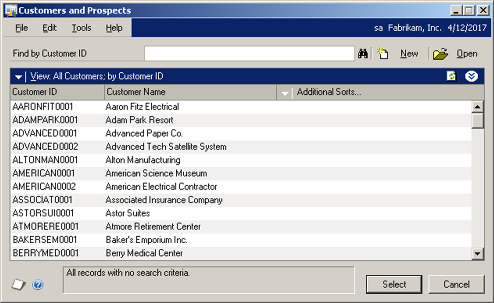
- Select the column header that you want your default view to be
- Click on the white down arrow highlighted by the red arrow above
- Select Set As Default View
You can also select to Exclude Inactive Customers!
 Terrapin Consulting is a premier provider of Dynamics GP Support. We can support you from anywhere in the USA & Canada. Terrapin Consulting is a premier provider of Dynamics GP Support. We can support you from anywhere in the USA & Canada. |  At Terrapin Consulting there’ll be a veteran CPA keeping an eye on your Dynamics GP system. At Terrapin Consulting there’ll be a veteran CPA keeping an eye on your Dynamics GP system. |
| www.terrcon.com / 843-376-1183 / accounting@terrcon.com | |